

Visual workflow builder
Build your outreach as cards on a canvas. Live counts show who is on every step.
LinkedIn automation
NurtureLead finds the right people on LinkedIn, reaches out with a workflow you pick, and its AI answers every reply until the call is in your calendar.
Set up for free in under 3 minutes


 Marcus BellHead of Growth at Northwind · LinkedIn
AI replies on
Works with
Calls land in Google Calendar or Outlook with a Google Meet or Microsoft Teams link. Emails go out from your own Gmail or Outlook.
Google Calendar · Outlook · Gmail · Google Meet · Microsoft Teams · Calendly · Cal.com · CSV and Excel
What you get
Under3min
to set up, for free
12
ready-made workflows
Up to10
LinkedIn accounts on one plan
Up to600
AI replies per account, each month
Accounts and AI replies grow with your plan.Compare plans
Set up for free
Connect your account, choose who to reach and press Start. Nothing to install.
Sign in once, on LinkedIn's own page. NurtureLead does not store your password.
Search LinkedIn or paste a search link, then pick what the AI works towards.
Pick one of 12 ready-made workflows, or build your own, and switch it on.
Then the AI answers replies and books calls into your calendar
Features
Find the right people, reach them with your own workflow, and let the AI answer until the call is in your calendar.
AI replies
Every reply is answered in your voice and steered towards your goal. When they agree a time, the call goes into your calendar.
 Elena VasquezLinkedInWhat does it cost for a team of 20?
 Rafael MonteiroInMailHappy to hear more.
Marcus BellLinkedInWednesday at 2:30pm works.
 Owen ClarkeEmailNot a fit for us right now.
Elena repliedThe AI takes it from here
Workflows
Lay out each step on a canvas: invites, profile visits, likes, messages, InMail and email, with waits and branches in between.
Find people
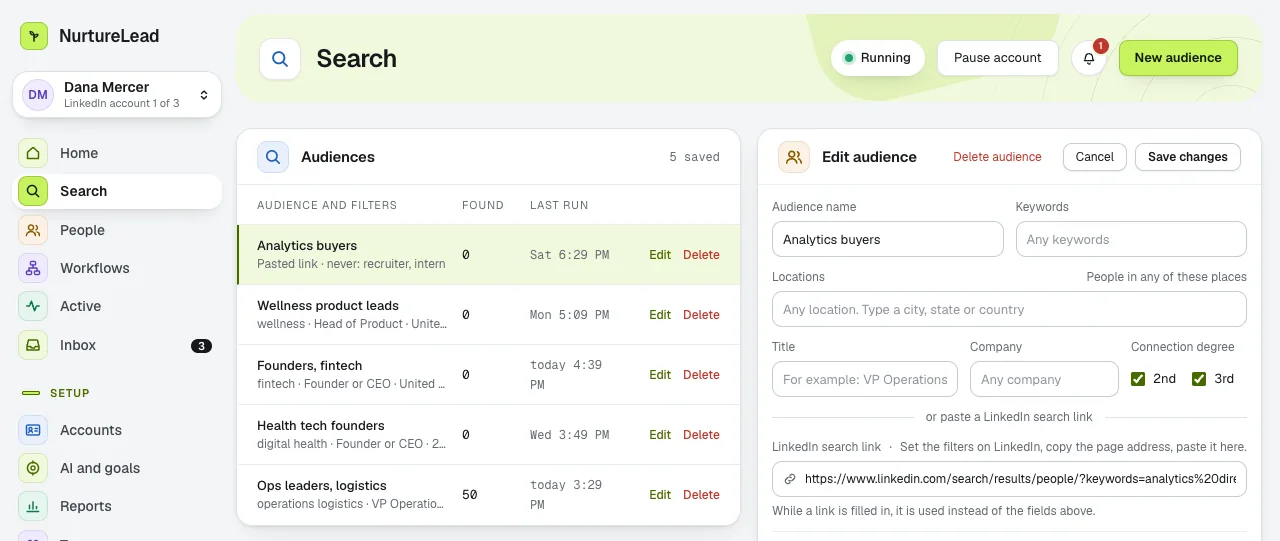
Search LinkedIn from inside NurtureLead, paste a search link you already use, or bring your own list.
Booked calls
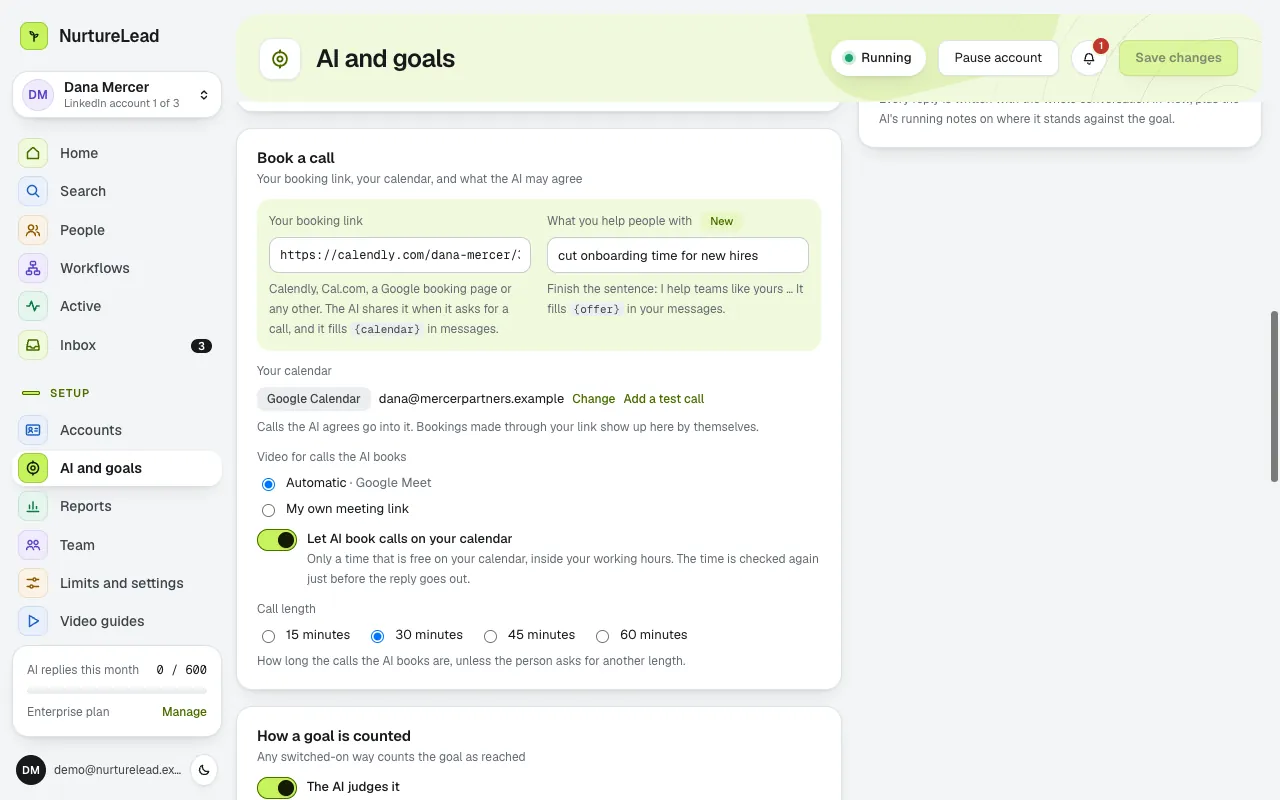
When someone says yes, the AI puts the call in Google Calendar or Outlook, with a Google Meet or Microsoft Teams link.
Features
Build your outreach as cards on a canvas. Live counts show who is on every step.
Replies in your voice, towards your goal, and books the call into your calendar.
Run 1, 3, 5 or 10 LinkedIn accounts from one place, each with its own inbox, one click apart.
Each account gets one central inbox for all your prospecting messages: its LinkedIn, InMail and email replies, side by side.
Search LinkedIn or paste a search link. Import CSV or Excel lists of up to 2,000 people.
See what worked as spreadsheets on every plan. Pro and above add a PDF report and a live share link.
Who it is for
Founders, recruiters, consultants and agencies all start the same way: a search, a workflow and a goal.
 Founder
Reach the buyers you want to talk to, in your own voice. When they reply, the AI answers and offers only times that are free on your calendar.

 Google Calendar with Meet
 Recruiter
Reach the candidates you want, in your own voice. When they reply, the AI keeps the conversation going until the first call is on your calendar.

 Outlook with Teams
 Consultant
Warm people up before you connect: a profile visit, a follow and a like on their latest post. When they reply, the AI answers in your voice until the call is booked.

 Calendly or Cal.com
 Agency owner
Run outreach for every client from one place. Each client gets a workspace of their own, with your name on everything they see.
Give every client a workspace of their own, with your name on everything they see.
Web app
Nothing to install. Your outreach keeps going when your laptop is closed.
Log in on the web and start. No downloads.
Connect each account once, on LinkedIn's own sign-in page inside the app.
Your accounts keep working when your laptop is closed, inside the hours you set.
Know the moment an account needs you: in the app, by email and as a desktop notification.
Trust
How NurtureLead handles your LinkedIn sign-in, your calendar and your payments, in plain words.
You sign in on LinkedIn's own page.
Your calendars and mailboxes are encrypted with AES-256-GCM.
Every page of the site and the app loads over HTTPS.
Handled by a PCI DSS Level 1 certified payment provider.
The AI checks your calendar again before it confirms a time.


 Your card number never reaches NurtureLead
Pricing
Questions
Anything else? The help centre has step-by-step guides and short videos.
Visit the help centreYearly plans start with 7 days free. You add a card to start, and the year is charged on day 8 unless you cancel first. Monthly plans have no trial.
No. You can cancel at any time and keep access to the end of the period you paid for.
Each LinkedIn account gets a monthly allowance of AI replies: 100 on Starter, 350 on Pro, 500 on Team and 600 on Enterprise. Need more? Add a top-up pack or move up a plan.
No. NurtureLead is not affiliated with, endorsed by or sponsored by LinkedIn.
Connect LinkedIn and your calendar, pick a ready-made workflow, and the AI answers every reply until the call is booked.
Set up for free in under 3 minutes
Your calendarOctober 12 to 16
Week
 11amIntro call
Client review
3:30pmOwen C.
10amMarcus B.
Lunch
 2:30pmIntro call
1pmElena V.
Planning
9:30amRafael M.
Lunch
 3pmInes D.
 11amIntro call
2pm offered