White-label LinkedIn automation for agencies, costs and margins
What white-label LinkedIn automation includes, what it costs per client at 10 and 25 accounts, and how to run client accounts under your brand.
NurtureLead is our product. Every other tool's prices and features here come from its own pages, checked on 5 October 2026.
An agency that runs LinkedIn outreach for clients sells a result, not a piece of software. The client should log in to your dashboard, at your web address, with your logo, and receive reports that carry your name. That is what white-label LinkedIn automation is for.
This guide explains what a full white-label setup includes, which tools offer one and on which plan, what it costs per client at ten and twenty-five accounts, and how to bring a new client on board in an afternoon.
What white-label LinkedIn automation includes
"White-label" is used loosely. Some tools mean a logo swap on reports. Others mean a full product under your name. Before you compare prices, check which of these the plan actually includes.
- Your name and logo everywhere a client looks: the login page, the app's header and the emails it sends.
- Your own web address, such as app.youragency.com, so clients never see the vendor's address.
- Your own email sender, so notifications and invitations come from your domain.
- The vendor out of sight. No "powered by" line, no vendor name in the footer, and your own terms and privacy links.
- Reports in your brand, as a PDF or a live link you can send without editing.
- Client workspaces and roles, so each client sees their own accounts and nothing else.
A plan that covers all six lets you sell outreach as your own service. A plan that covers one or two is a branded report, which is useful but not the same thing.
White-label LinkedIn automation compared
The table shows where each tool offers white-label, and what ten and twenty-five LinkedIn accounts cost on one subscription.
| Tool | White label | 10 LinkedIn accounts | 25 LinkedIn accounts |
|---|---|---|---|
| NurtureLead | Yes, on Enterprise | $299 a month, $199 on yearlyOn Enterprise. | $1,034 a month, $934 on yearlyOn Enterprise. With 15 extra accounts at $49 a month each. |
| HeyReach | On Agency, from $999 a month | $590 a month, $470 on yearlyOn Growth. At its price for 10 or more senders. | $999 a month, $799 on yearlyOn Agency. |
| Closely | Included on every plan | Not listed | Not listed |
| Expandi | On Agency, price on request | Not listedAgency pricing for 10 seats or more is quoted on request. | Not listedAgency pricing for 10 seats or more is quoted on request. |
| Skylead | An option on its agency plan | $1,000 a monthOn All-in-one. | Not listed |
| SalesRobot | A separate reseller programme | $590 a month, $390 on yearlyOn Basic. Team management is on Professional. | $825 a month, $550 on yearlyOn Basic. With its discount for 20 to 35 accounts. |
| Aimfox | On Agency, though its own pages disagree | $490 a monthOn Outreach seat. | $599 a monthOn Agency. With 5 seats over its 20. |
| Botdog | Not listed | $499 a month, $349.33 on yearlyOn Agency, 10 senders. | $1,199 a month, $839.33 on yearlyOn Agency, 30 senders. Its next size up from 20 is 30 senders. |
NurtureLead includes white-label on Enterprise: your name, logo and colours, your own web address, your own email sender, reports in your brand, client workspaces, and the option to hide NurtureLead completely. Enterprise is $299 a month for ten LinkedIn accounts, or $199 on yearly billing, then $49 a month for each account after ten.
HeyReach includes one white-label brand on its Agency plan, $999 a month for 25 senders or $799 on yearly billing. Its larger plans add more brands. Its software does not answer replies itself.
Closely includes white-label on every plan, from one account upwards, with your domain, colours and logo. Its plans bundle one, three or five accounts, and larger numbers are priced with a calculator on its site.
Expandi offers white-label on its Agency plan for ten seats or more, priced on request.
Skylead lists white-label as an option for agencies, agreed with its team.
SalesRobot runs a separate reseller programme that puts its product, support and help centre under your brand. Its price is not published.
Aimfox describes white-label on its agency plan, though its own pricing FAQ says the white-label is not yet complete.
Botdog sells agency plans by number of senders, without white-label listed.
What it costs per client
The useful number for an agency is the tool cost per client, because that is what comes off every retainer before your team's time. Assume one LinkedIn account per client.
At ten clients, NurtureLead Enterprise comes to $29.90 per client a month, or $19.90 on yearly billing, with white-label, client workspaces and AI replies included. HeyReach at ten senders on its Growth plan comes to $59 per sender, without white-label, which starts on its Agency plan. Botdog's ten-sender plan comes to $49.90 per sender.
At twenty-five clients, NurtureLead Enterprise with fifteen extra accounts comes to $41.36 per client a month, or $37.36 on yearly billing. HeyReach's Agency plan comes to $39.96 per sender, or $31.96 on yearly billing. At this size the tool cost per client is close, and the difference is in what the tool does for the client after prospects reply.
That difference shows up in your team's hours. If prospects' replies wait for someone at the agency to answer them, every new client adds inbox time. If the AI answers in the client's voice, towards the client's goal, and books calls into the client's calendar, each new client adds far less.
Running client accounts in NurtureLead
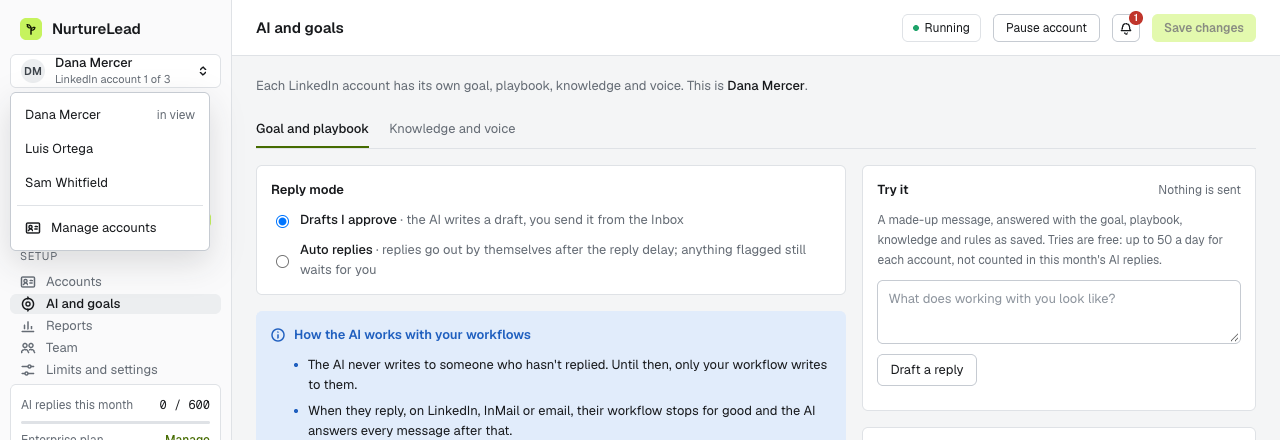
Each client gets its own workspace, and each LinkedIn account in it has its own settings.
- Its own goal, knowledge and voice. The AI for one client answers from that client's offers, prices and answers, in that client's voice, towards that client's goal.
- Its own calendar. Connect the client's Google Calendar or Outlook to their account, and the AI books calls straight into it, at times the client is free, with a Meet or Teams link.
- Its own workflows and audiences. Searches, audiences and workflows belong to the client's account.
- One inbox for your team. Replies from every client account land in one central inbox, so your team can follow every conversation without switching logins.
- Logins for the people who need them. Enterprise includes as many logins as you need. Owners and admins see everything; a member sees only the accounts assigned to them, so a client can log in and see their own account and nothing else.
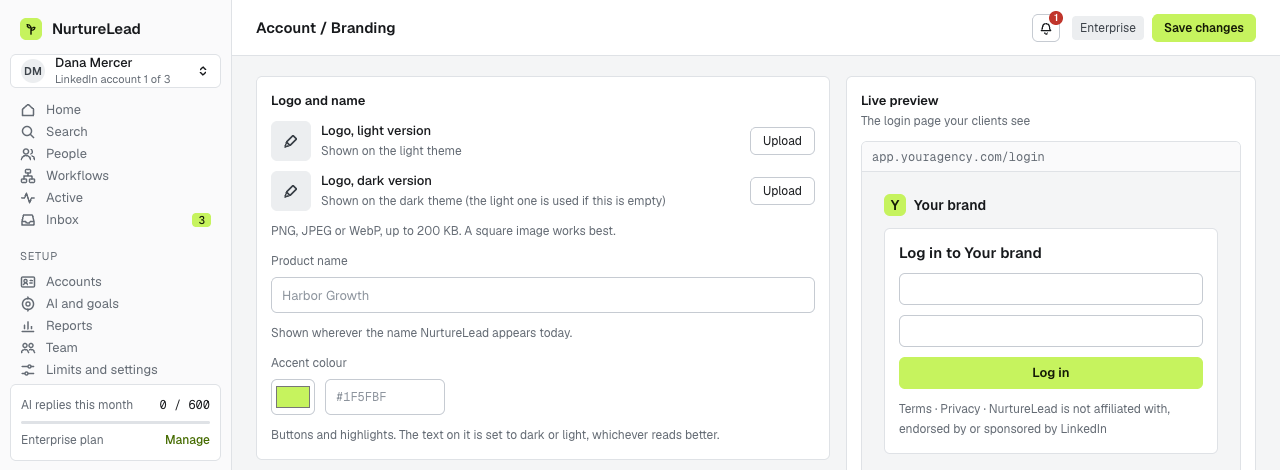
Under Branding you set your name, logo (and a version for dark mode), accent colour, web address and email sender. Once your address is set up, the login page and the app appear at it in your brand, and you can choose to keep NurtureLead out of sight, with your own terms and privacy links in its place.
When a client's prospects reply
For an agency, a reply is where the client's reputation is on the line. Someone has answered a message sent in the client's name, and whatever comes next reads as the client speaking. NurtureLead's AI is built for exactly that moment.
- It speaks only from the client's facts. Offers, prices and answers come from that client's knowledge base, and prices only exactly as written. It never borrows a fact from another client's account.
- It hands over what it should not answer. Price negotiation, questions it was not given an answer to, and anyone asking whether they are talking to AI all come to the inbox for a person to handle.
- It stops at a no. A clear no ends the conversation, with no further follow-ups.
- It books only real times. Offered times are free on the client's own calendar, checked again just before sending, and the invite comes from the client's calendar.
You decide who handles the handovers. Your team can answer them from the shared inbox, or a client who logs in as a member can answer their own, which suits clients who like to take sales calls themselves.
Bringing a new client on board
- Create the client's workspace and add their LinkedIn account. The client signs in once, in the sign-in window. See setting up client workspaces.
- Set the goal for that account, usually a booked call.
- Fill the knowledge base from the client's website and the questions they hear most, and add a few of their own messages as voice samples.
- Connect the client's calendar and choose the length of their calls. An owner or admin starts the connection, and the client signs in on Google's or Microsoft's own page, which is easiest on a short call together.
- Build the first workflow from a template and attach the client's audience to it.
- Invite the client as a member, with access to their own account only. See team members and roles.
- Send the first report in your brand at the end of the first week. See sharing unbranded reports.
Packaging the service for your clients
Agencies package LinkedIn outreach in a few common ways. Whichever you choose, the tool cost per client from the section above is the floor under your price.
- A monthly retainer per LinkedIn account. The simplest to sell and to forecast. It covers the searches, the workflows, the replies and a monthly report. Add a second account for a client's co-founder or sales lead as a second line on the invoice.
- A set-up fee plus a retainer. The first weeks take the most work: the client's audience, the knowledge base, the voice samples, the first workflow and the calendar. A set-up fee pays for that once, and the retainer pays for running it.
- A retainer plus a fee per booked call. Clients like paying for results, and booked calls are easy to count: each one is in the client's calendar, and NurtureLead counts the goal when it happens. Agree in writing what counts as a booked call, for example one the prospect attends.
Whichever model you use, put the client's own goal in the account from day one. The AI works towards it, the reports count it, and the conversation about renewal starts from a number both sides already trust.
Keeping many client accounts organised
Twenty client accounts are manageable when every one of them follows the same structure. A few habits help.
- One workspace per client, named after the client, with every LinkedIn account for that client inside it.
- The same first workflow for every new client, adapted from a template, so your team knows where each person is in the sequence at a glance.
- Drafts for the first two weeks. New clients get AI replies as drafts your team approves. Once the knowledge base covers the questions prospects ask, switch that account to automatic replies.
- A fixed time each day for the inbox. Replies from every client land in one central inbox. Clear it once in the morning and once in the afternoon, and let the AI handle the rest.
- A monthly knowledge base review. Prices, offers and answers change. Ask each client once a month what has changed, and update their account the same day.
Showing clients what you did
Clients renew when they can see the work. Reports show invites sent, the acceptance rate, the reply rate and goals reached, by week and by workflow, for any range of dates. On Enterprise you can send them as a PDF in your brand or as a live link that always shows the latest figures, and you can revoke a link at any time. A client who logs in as a member sees their own account's conversations and booked calls, and nothing from your other clients.
Questions to ask any white-label provider
- Does the plan include my own web address, or only my logo?
- Do emails to my clients come from my domain?
- Can I hide the vendor's name everywhere, including the footer and the terms?
- Can each client log in and see only their own accounts?
- What does each extra client account cost once I am past the plan's included accounts?
- When a prospect replies, who answers: my team, a draft that someone must send, or AI that can book the call?
The last question decides how many clients your team can run, so ask it early.
Frequently asked questions
Does NurtureLead offer white-label?
Yes, on Enterprise. It includes your name, logo and colours, your own web address, your own email sender, reports in your brand, client workspaces, and the option to keep NurtureLead out of sight.
Can my clients log in?
Yes. Enterprise includes as many logins as you need. A client added as a member sees only the LinkedIn accounts you assign to them.
Can I use my own web address?
Yes. Point a subdomain of yours at NurtureLead, and the login page and the app appear at your address once it is checked.
Will my clients see NurtureLead anywhere?
Not if you choose to keep it out of sight. You then add your own terms and privacy links, and the login page, the app, the emails and the reports carry your brand alone.
Can the AI book calls into each client's own calendar?
Yes. Each LinkedIn account connects its own Google Calendar or Outlook, so the AI for each client offers that client's free times and books calls into that client's calendar, with a Meet or Teams link and an invite sent from it.
What does each client account cost past ten?
Each LinkedIn account after the ten included in Enterprise is $49 a month.
See NurtureLead for agencies, your logo, colours and web address and pricing. For every tool's prices side by side, read the best LinkedIn automation tools in 2026.